AI Thinking Workspace for Research and Analysis,not just an answer engine
MindMax gives you a visual canvas to explore questions, organize source material, compare viewpoints, and apply mental models. Use it for research, strategy, learning, and turning complex thinking into clear outputs.
What is MindMax Workspace?
MindMax Workspace is an AI-powered thinking & exploration canvas. Unlike traditional mind maps, it lets you break down problems, explore multiple perspectives with AI guidance, and transform your thinking into documents and presentations—all in one place.
Infinite Canvas
Explore ideas on an unlimited canvas. Break down complex problems into branches, compare options side by side, and see the full picture of your thinking without space constraints.
AI-Powered Exploration
Apply 188+ mental models with AI guidance. Analyze problems from multiple angles, identify risks, and discover insights you might have missed with traditional thinking methods.
Structured Output
Turn structured thinking into documents, articles, presentations, and shareable outputs. No more copy-paste between tools - everything connects naturally in one workspace.
MindMax: Mind Mapping, Evolved.
Traditional Mind Map Tools
- •Manual drawing and arrangement
- •Static structure, hard to explore alternatives
- •Standalone tool, disconnected from writing and presenting
MindMax Thinking Workspace
- ✓AI-powered exploration with branch expansion and follow-ups
- ✓188+ mental models to structure your thinking
- ✓Seamless flow: thinking → writing → presenting in one place
Think through complex problems on a canvas you can keep advancing
MindMax is built for work that needs structure, comparison, and iteration—not just one-off answers. Start inside the workspace, then keep expanding, organizing, and outputting from the same canvas.
Workspace detail 1
Your input does not disappear after one answer
Webpages, PDFs, YouTube videos, text, and questions become a structure you can keep organizing and expanding in MindMax.
Workspace detail 2
One question can branch into multiple lines of thinking
Keep exploring alternatives, evidence, and counterarguments on the canvas instead of getting trapped in a single-thread chat.
Workspace detail 3
Once the thinking is clear, you can write, present, and share right away
When the structure is clear, MindMax can carry it into documents, slides, and shared canvases without making you rebuild everything.
Start from a question, and MindMax turns content into a structured canvas you can keep expanding, comparing, analyzing with mental models, and turning into output. That is the core difference from a traditional chat experience.
Start from a question, a note, or source material
The core product is the workspace. Open MindMax directly when you want to think through a topic, or use the extension when browser content is your quickest starting point.
Workspace first
Open MindMax and start thinking in structure
Best when you already know the topic, problem, decision, or idea you want to work through.
Open MindMax
Enter a topic, question, or working note
Build structure, compare paths, and create output
Browser import
Bring source material into the workspace when needed
Best for read-and-think workflows. Capture a webpage, PDF, YouTube video, or text as the first map, then continue the real analysis in MindMax.
Install the free Chrome extension
Capture the first map in the browser
Open it in MindMax for deeper analysis and output
Extension preview
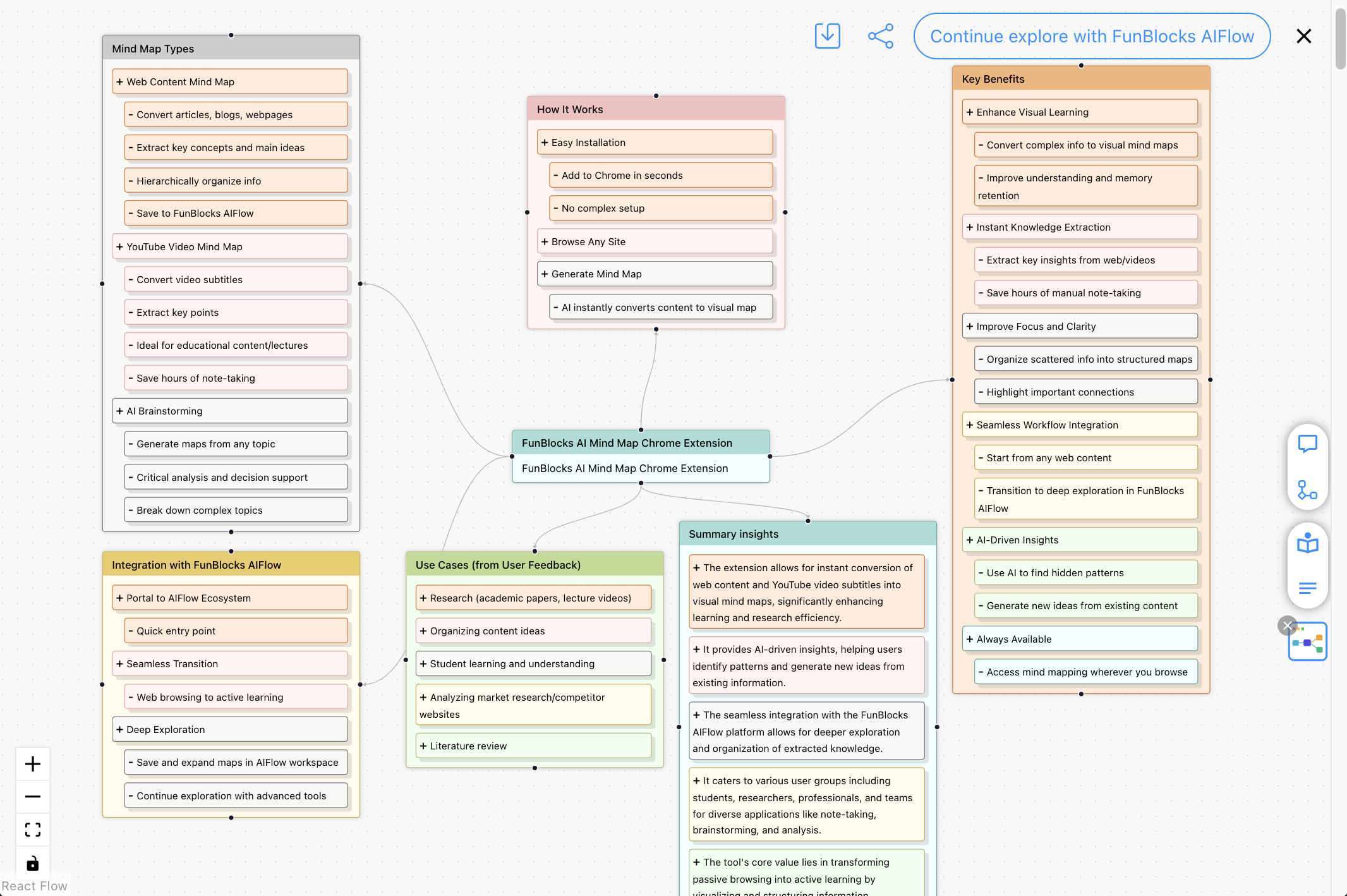
Browser add-on
Need to pull in what you are reading? Use the AI MindMap extension
If your thinking often starts from webpages, PDFs, or YouTube videos, the extension is the fastest way to capture the first map and send it into MindMax.
See how the extension worksMove from problem framing to analysis and output in one place
Frame the problem, build structure, compare options, apply mental models, and turn the result into docs, slides, or visuals without losing context.
Break the problem into a clear structure
Turn a vague problem into dimensions, sub-questions, and key variables so it is easier to analyze.
Keep expanding the idea
Grow branches, compare angles, and add clues from one question without being limited by a linear chat thread.
Look at the problem from a different lens
Use classic mental models as analysis lenses so decisions feel more systematic and grounded.
Turn thinking into work you can share
Transform structured thinking into documents, slides, and visuals with less distance between idea and output.
Especially good for complex problems
Use AI like a thinking workbench to move from ambiguity to structure
Traditional AI tools often stop at answers. MindMax focuses on putting those answers back into structure. Break a problem down, expand branches, cluster information, apply multiple mental models, and shape the result into something clear and explainable.
Make mental models genuinely useful in analysis
You do not need to memorize complicated frameworks first. Just switch lenses and let AI help you see the key variables, risks, counterexamples, and next moves.
Break a problem back down to facts, constraints, and variables so you can redefine what really matters.
Start by asking what would create failure, bad judgment, or waste, then design around those risks.
Split one problem into information, risk, creativity, emotion, benefits, and process so each lens gets its turn.
Look beyond the immediate effect and trace what happens next, and then what happens after that.
Latticework in practice
The real value is not picking one model, but cross-checking the same problem with several models
Complex problems rarely have one simple answer. MindMax works best when you place lenses like First Principles, Inversion, Six Thinking Hats, and Second-Order Thinking on the same canvas and compare them before forming a stronger judgment.
Three common kinds of work where MindMax helps you move forward
Whether you are doing research, strategy analysis, or content creation, MindMax helps turn scattered information into structure you can keep advancing.

Learning & research
Turn books, webpages, PDFs, and videos into knowledge you can keep exploring
Great for reading, coursework, literature review, topic research, and long-term knowledge organization.

Brainstorming & analysis
Expand one problem into multiple paths instead of stopping at one answer
Great for strategy work, product planning, brainstorming, option comparison, and complex problem solving.

Writing & expression
Turn what is on the canvas into documents, slides, and visual outputs
Great for content creation, proposals, presentations, and turning complex thinking into something people can use.
From question or source to structured analysis and output
Whether you start inside MindMax or bring in source material, the workspace helps you build structure, deepen the analysis, and carry it forward into usable output.
Start from a question, notes, or source material
Begin in MindMax with a topic, problem, brief, notes, or imported webpage, PDF, video, or text when useful.
Build the working structure
Turn the starting point into a canvas of branches, dimensions, and key questions you can keep refining.
Expand, compare, and reorganize the thinking
Explore different angles on the canvas and turn scattered information into a fuller understanding.
Apply mental models for deeper analysis
Use AI together with mental models to test assumptions, surface risks, and build stronger judgment.
Turn the structure into docs, slides, or shared output
Convert the structured thinking into documents, slides, visuals, or a shared canvas others can keep exploring.
See the whole flow at a glance
Keep moving after sharing
What you share is not a static answer, but a canvas others can keep building on
Share your thinking structure with others so they can duplicate it, extend it, and reorganize it further. This is especially useful for team brainstorming, teaching, research, and complex discussion.
Research flow
After reading a long piece, build a research frame fast
Generate the first structure and key concepts
Add evidence, questions, counterexamples, and further reading on the canvas
Turn the research frame into notes, an article, or material to share
You end up with a research frame you can keep writing from and discussing, not a one-off summary.
Related thinking guides
Strategy flow
Break a fuzzy problem into multiple comparable paths
Generate several paths around goals, constraints, and variables
Compare trade-offs, risks, and second-order effects
Use different mental models to move toward a stronger judgment
Great for product planning, business analysis, complex decisions, and team discussion.
Related thinking guides
Creation flow
Turn clear thinking into writing and presentations
Pull a clear narrative out of the canvas
Develop it into an article, notes, or explanatory writing
Package the core conclusions into slides or material to share
Reduce the gap between understanding something and explaining it clearly.
Related thinking guides
MindMax sits at the center of the thinking-to-output workflow
Bring in browser material when useful, do the real analysis in MindMax, then continue into documents or presentations without repeated copy-paste and handoff.
AI MindMap Extension
Capture structure while you browse
When you are on a webpage, PDF, YouTube video, or a block of text, it is the fastest way to extract structure and bring it into MindMax.
MindMax Workspace
Keep analyzing, comparing, and refining on the canvas
This is where deeper thinking happens. Expand branches, organize structure, apply mental models, and move ideas toward conclusions.
Text Editor
Turn structure into notes, articles, and plans
When you are ready to write, Text Editor picks up the existing structure so expression feels smoother.
Slides
Turn conclusions into presentations and teaching materials
When you need to present, report, or teach, Slides turns the existing structure into a format that is easier to show.
A connected workflow
User feedback
Already used in real research, analysis, and creation workflows
MindMax is not just a concept demo. People already use it in learning, research, analysis, and creative work.

See how people use MindMax to make ideas clearer
From learning and research to complex analysis, brainstorming, and expression, MindMax helps people turn scattered information into clearer and more actionable results.
"MindMax changed our strategy discussions from collecting answers into expanding the problem. The team sees alternative paths faster and reaches stronger decisions in complex situations."
"I use MindMax for literature review and research framing. The biggest win is not just saving time—it is seeing the relationships and gaps between concepts much more clearly."
"Our brainstorming used to stop at a pile of scattered ideas. Now we can expand, compare, and converge on the same canvas, then turn it into output right away."
"From browser content to a mind map, then into documents and slides, the flow feels natural. MindMax really connects input, thinking, and expression."
Common questions about the MindMax workspace
If you are deciding whether MindMax fits your work, start with these common questions.
Ready to start?
Start in the workspace,and keep your whole thinking flow connected
Open MindMax directly to think through a problem, or use the extension when you want to bring browser content in first. The workspace remains the center of the workflow.